Pro Credit Card Reader NFC
Julien MILLAUFinance
4.453.00 Reviews
- Version
- 5.6.2
- Installs
- 10.00K
- Age Rating
- Everyone
Screenshots
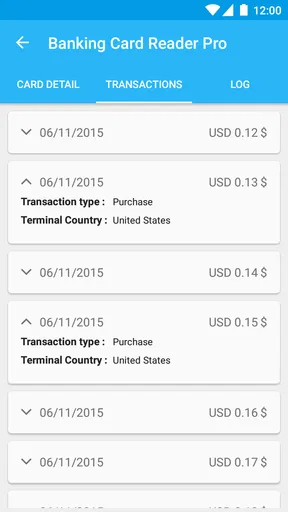
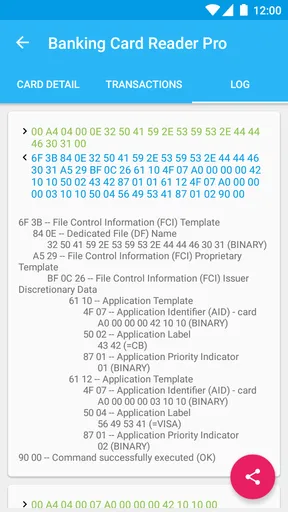
Our Review of Pro Credit Card Reader NFC
 Analysis by Appyee
Ever found yourself in a situation where you need to manage your credit cards on the go? Well, I recently stumbled upon the Pro Credit Card Reader NFC app and decided to give it a whirl. Let me walk you through my experience with this nifty little tool.
What the first week feels like
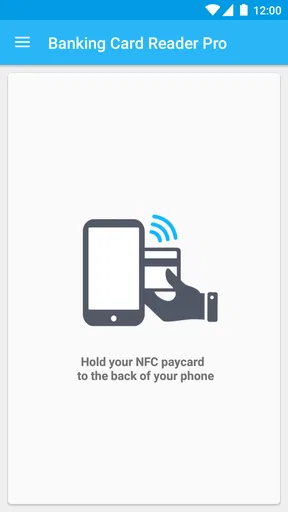
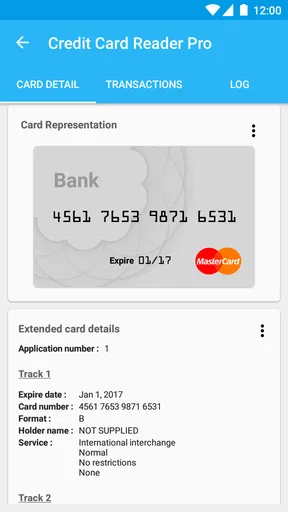
The first appeal is easy to understand: a phone with NFC can read public data from a supported contactless banking card, including Visa and Mastercard cards. That makes the app useful when I want to inspect information already available through the card’s contactless interface, rather than keep searching for a paper note or a card envelope. It is a focused job, not a replacement for a bank’s app or a place to make payments.
That distinction matters before the novelty wears off. I would try it first with a card I am comfortable handling and use the instructions carefully, holding the card steadily near the phone’s NFC area. If a read does not work on the first attempt, I would reposition the card and try again before assuming the card or app is unusable. NFC placement can be particular, and the phone’s antenna location is not always obvious.
Pro Credit Reader is the short description for this finance app by Julien MILLAU. Its central appeal is practical rather than broad: it is for people who have a reason to access public contactless-card data and a compatible NFC phone. If you only want to check balances, freeze a card, or review transactions, your bank’s official app is the more appropriate everyday tool.
Where it can earn a recurring place
A realistic use is checking a card’s readable public details while sorting out several cards at home, perhaps before deciding which one to carry for an upcoming trip. I would keep the physical card in hand, scan one card at a time, and compare the result with what I already know. That small, deliberate workflow is more useful than treating a scan as a complete financial record.
The practical trade-off is that reading a card is not the same as managing an account. The app should not be confused with a wallet that stores payment credentials for checkout, nor with a banking dashboard that tracks spending. For ongoing account management, I would use the bank’s own tools; for a narrow NFC-reading task, this app has a clearer purpose than a general finance organizer.
Things to check before relying on it
Compatibility is the first question I would settle. The app’s minimum operating system is Android 5.0, but the phone also needs working NFC hardware for contactless reading. Before paying, I would check that NFC is available on my device and enabled, then confirm that I am using a supported card. A phone without NFC cannot do the central job, regardless of how simple the interface may be.
Privacy deserves a careful approach with any financial-card reader. I would avoid scanning someone else’s card without permission, and I would not treat readable public data as harmless merely because it is not the same as a bank login. Keep the phone under your control during a scan, and avoid sharing screenshots or readouts that could expose card-related details. Those habits are sensible whether or not an app offers additional protections.
The app is best suited to a curious, careful user who understands the difference between public card data and account access. It is less suitable for anyone expecting contactless payment, spending analysis, card controls, or automatic synchronization with a bank. Those needs call for a different kind of finance app, and choosing one built for them will save frustration.
Getting Started with the App
Downloading the app was a breeze. It's available on both Android and iOS, so no matter what device you're rocking, you're covered. Once installed, I was greeted with a sleek and intuitive interface. The app doesn't bombard you with unnecessary features, which is refreshing. It's clear that the focus here is on ease of use.
In practical terms, though, I would verify platform availability and NFC support on the exact device I plan to use, rather than assume that every phone can perform the same task. The listed minimum OS is 5.0, and the app is rated Everyone. Those details help set expectations, but they do not replace checking for NFC hardware: the reader’s main purpose depends on it.
Features That Stand Out
The Pro Credit Card Reader NFC app primarily serves as a digital wallet, but it does much more than just store your card info. One of the first things I noticed was the NFC functionality. This allows you to read and manage your credit card information directly from your phone. It's a real game-changer for those who frequently use contactless payments.
I would describe its most distinctive use more narrowly: reading public information from a contactless card, not making a tap-to-pay transaction. That difference is easy to overlook because both activities involve NFC. If I needed to pay at a shop, I would use a payment wallet or the card itself; if I wanted to inspect what the card makes available over NFC, this reader is the relevant tool.
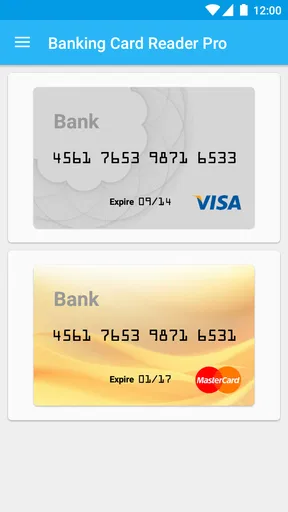
Another cool feature is the card management system. You can categorize your cards, making it super easy to find what you need when you need it. Plus, with the added security measures, I felt confident that my information was safe and sound.
For someone carrying several cards, categorizing them can help turn a one-off scan into a more orderly reference routine. I would use clear labels that identify the card without putting sensitive details into a name, and keep the collection limited to cards I actually need to revisit. That keeps the app useful without turning it into a substitute for a secure, complete financial record.
User Experience
Using the app was a smooth ride. The developers clearly put a lot of thought into user experience. The layout is clean, and navigating through the app is straightforward. Even if you’re not tech-savvy, you’ll find it easy to figure out.
I also appreciated the detailed instructions provided for each feature. Whether you're setting up your NFC or organizing your cards, there's a handy guide to help you through the process. The app doesn't assume you know everything, which is a nice touch.
That guidance is especially useful when the card is not read immediately. I would follow the on-screen steps, move the card slowly around the phone’s NFC area, and avoid changing several things at once. Doing one adjustment at a time makes it easier to tell whether the issue was card placement, an NFC setting, or a compatibility problem. It is a simple troubleshooting habit, but it is more reliable than repeated random tapping.
Security Measures
In today's digital age, security is paramount, and the app doesn't disappoint in this area. It uses encryption to protect your data, and there's also the option to set up a PIN or use biometric authentication for added security. I felt reassured knowing that accessing my financial info required more than just opening the app.
Even with those protections, I would keep my expectations measured: a PIN or biometric lock helps control access to the app, but it does not make every possible use of a scanned card risk-free. I would use the phone’s own screen lock, avoid leaving the device unattended during a scan, and think twice before keeping information I no longer need. The most secure routine is one that minimizes unnecessary exposure as well as adding a lock.
Potential Drawbacks
While the app is fantastic in many ways, it's not without its quirks. I did notice that the NFC reading feature can be a bit finicky at times. It took a few tries to get it to recognize my card, which can be a tad frustrating. However, once it works, it works well.
This friction has a real effect on long-term value. If I only need to read a card once, a few retries are a minor annoyance; if I expect quick, dependable scans every day, those retries may make a dedicated reader feel less convenient than simply using the bank’s app for the information it already provides. I would judge it by the specific task I need, not by how impressive NFC sounds in a feature description.
Additionally, if you're someone who loves an app with tons of customization options, you might find Pro Credit Card Reader NFC a bit lacking. It sticks to the basics, which is great for simplicity but might leave some power users wanting more.
It also has a narrow ceiling: a card reader cannot answer questions that require account data, such as recent purchases or a current balance. That is not a flaw in NFC reading so much as a mismatch in expectations. I would keep the bank’s official app for those jobs and open this one only when I have a concrete reason to read a contactless card.
Does it stay useful after the novelty?
For a first-week trial, the app is easy to understand: check NFC support, follow the instructions, and test a compatible card with care. The month-to-month case is more conditional. If I regularly inspect contactless-card data or organize several cards for reference, the focused purpose may justify keeping it installed. If I scan once and have no recurring need, it is harder to defend a permanent spot on my phone.
The app costs $5.99, so I would decide based on that repeat use rather than the novelty of seeing a card communicate with a phone. Its average rating is 4.4 from around 1,000 ratings, and it has over 10,000 installs; that gives a prospective user some context, but it cannot tell me whether the app fits my particular phone and card combination. I would check compatibility and intended use first.
Version 5.5.14 is the current version, and the app was released on November 5, 2015. For long-term use, I would pay attention to whether it continues to work on my own device and whether its limited role still solves a recurring problem. A focused utility can age well when the task remains relevant, but it does not become an all-purpose finance manager simply by staying installed.
Final Thoughts
All in all, the Pro Credit Card Reader NFC app is a solid choice for anyone looking to manage their credit cards efficiently. It's user-friendly, secure, and offers fantastic NFC capabilities. Sure, it has a couple of minor hiccups, but they’re not deal-breakers by any means.
If you're in the market for an app that keeps your credit card management simple and straightforward, you might want to give this one a try. It’s a handy tool that delivers on its promises, making financial management a little less of a headache.
My lasting-use verdict
I would recommend it to someone who knows exactly why they need an NFC reader and is comfortable treating card scans as a limited, careful task. For a person who handles several contactless cards and wants to inspect public data occasionally, it can be a handy specialist tool. For someone hoping to pay by phone, monitor accounts, or get a complete view of personal spending, a bank app or payment wallet is the better fit.
My advice is to make the first test deliberate: confirm NFC on the phone, use a card you are authorized to scan, follow the instructions, and see whether the read is useful enough to repeat. If that becomes a real habit, the app has a reason to remain installed. If the first scan is only a curiosity, I would not expect the novelty alone to earn it lasting space.
Verdict
Strengths of Pro Credit Card Reader NFC
- Quick and easy NFC card scanning.
- Supports multiple card types seamlessly.
- Intuitive user interface design.
- Secure data encryption protocols.
- Offline mode available for convenience.
Limitations of Pro Credit Card Reader NFC
- Limited support for some older devices.
- Occasional NFC detection issues.
- No cloud backup for scanned data.
- Free version includes ads.
- Requires manual updates for card types.
Similar Picks in This Category
View All
Google Wallet
Google LLC4.3

Airtel: Recharge, Bank & Loans
Airtel4.0

PayPal - Pay, Send, Save
PayPal Mobile4.2

DANA Indonesia Digital Wallet
PT Espay Debit Indonesia Koe4.5

Binance: Buy Bitcoin & Crypto
Binance Inc.4.8

Cash App
Block, Inc.4.7
Frequently Asked Questions
What is Pro Credit Card Reader NFC and how does it work?
Pro Credit Card Reader NFC is an app designed to read NFC-enabled credit cards. It utilizes Near Field Communication technology to access data stored on your card, such as card number and expiration date. The app is often used for quick data retrieval or for educational purposes regarding NFC technology.
Is Pro Credit Card Reader NFC safe to use?
Safety is a primary concern when using any app that accesses personal information. Pro Credit Card Reader NFC does not store or transmit your data, ensuring that your information remains private. However, always ensure you're downloading the app from a reputable source and have the latest security updates on your device.
Does Pro Credit Card Reader NFC support all types of credit cards?
The app supports most NFC-enabled credit and debit cards. However, compatibility may vary based on the card issuer and the specific NFC technology used in the card. It's recommended to check with your card provider or test the app with your card for compatibility confirmation.
Can I use Pro Credit Card Reader NFC for making payments?
No, Pro Credit Card Reader NFC is not designed for making payments. It is primarily a reader app meant for scanning and displaying information stored on NFC-enabled cards. For payments, you would need digital wallet apps like Google Pay or Apple Pay that securely handle transactions.
Is an internet connection required to use Pro Credit Card Reader NFC?
No, an internet connection is not required to read NFC cards with Pro Credit Card Reader NFC. The app functions offline since it uses the NFC hardware built into your device. However, you may need internet access for downloading updates or additional functionality.
